Discover the Power of a Color Palette Generator
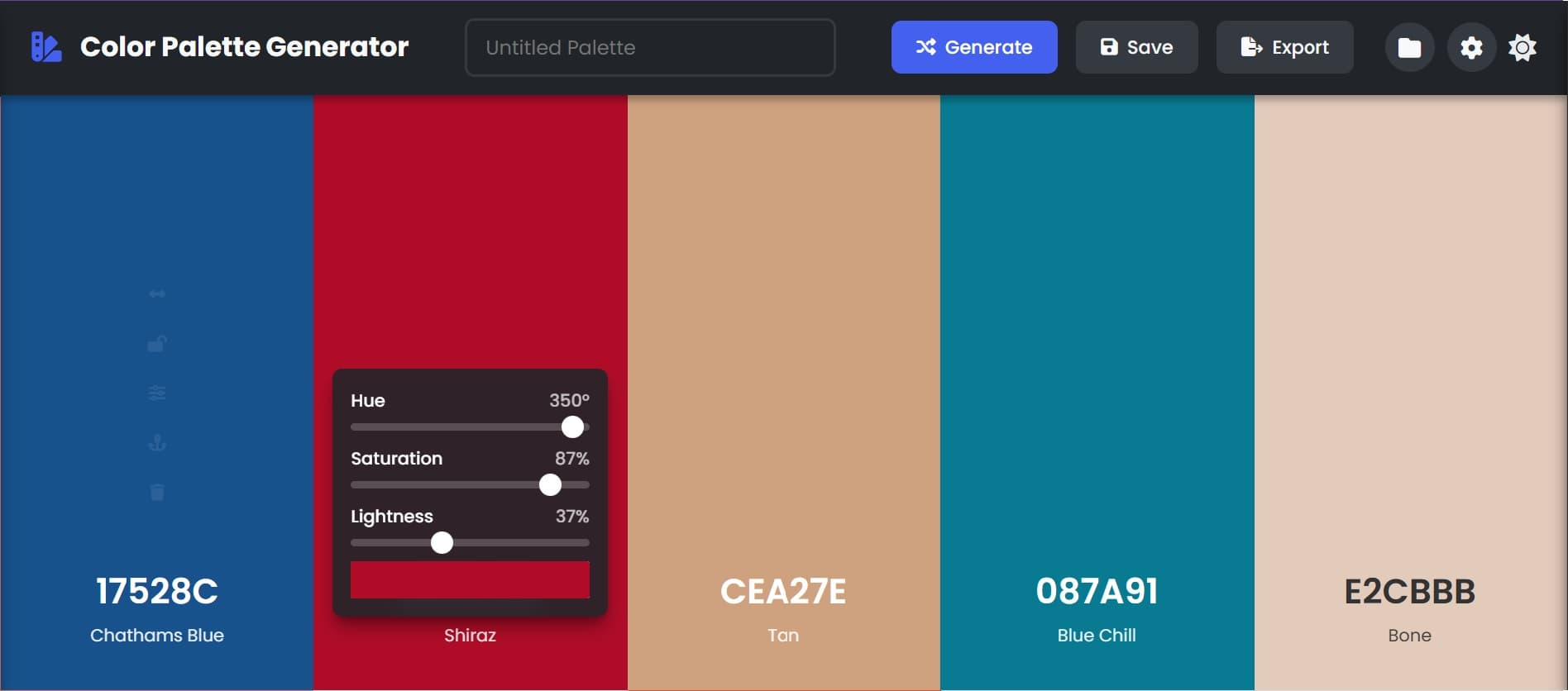
In the vast and vibrant world of design, colors are more than just visual elements; they are powerful tools that evoke emotions, communicate messages, and establish brand identities. Crafting a cohesive and aesthetically pleasing color scheme, however, can often be a challenging task. This is where a Color Palette Generator becomes an indispensable asset.
What is a Color Palette Generator?
A Color Palette Generator is a digital tool designed to help users create, explore, and refine harmonious color combinations. Instead of manually selecting individual colors and hoping they complement each other, these generators leverage color theory principles (like analogous, complementary, or triadic harmonies) or advanced algorithms to suggest balanced and visually appealing palettes. Our Pro Color Palette Studio aims to simplify this process, making professional color scheme creation accessible to everyone.
Key Features of Pro Color Palette Studio
Our Color Palette Generator is packed with intuitive features designed to streamline your creative workflow:
Dynamic Color Generation
Instantly generate new palettes with a single click or press of the Spacebar.
Diverse Harmony Rules
Explore Random, Analogous, Monochromatic, Triadic, Complementary, Split Complementary, Tetradic, and Square palettes.
AI-Assisted Harmony
Toggle intelligent generation for advanced algorithms that create unique, aesthetically pleasing, and diverse palettes.
Individual Color Control
Adjust Hue, Saturation, and Lightness (HSL) of any color using intuitive sliders or a precise color picker.
Lock & Unlock Colors
Preserve specific colors you love while generating new ones for the rest of the palette.
Drag-and-Drop Reordering
Easily rearrange colors within your palette to find the perfect visual flow.
Add & Delete Colors
Customize palette size by adding new colors or removing unwanted ones.
Palette Management
Save favorite palettes to personal collections, load anytime, or import/export JSON files.
Versatile Export Options
Export in CSS, SCSS/LESS, JSON, SVG, PNG, Text, Photoshop (ASE), or Sketch Palette formats.
Interactive Color Wheel
Visually select a base color and generate harmonious palettes, enhancing creative control.
Dark Mode Support
Switch between light and dark themes for comfortable use in any environment.
Keyboard Shortcuts
Boost efficiency with handy shortcuts for common actions like generating, saving, and navigating.
How to Use Our Color Palette Generator
Getting started with the Pro Color Palette Studio is straightforward. Follow these steps to unleash your creativity:
- Generate Your First Palette: Click the "Generate" button or press the Spacebar. The tool will instantly create a random palette. Adjust "Initial Number of Colors" in Settings.
- Explore Harmony Types: Open "Settings" (gear icon) and select a "Palette Type" like "Analogous" or "Complementary" for rule-based generation.
- Leverage AI-Assisted Generation: In "Settings", check "AI-assisted color harmony" for advanced, unique palettes.
- Customize Individual Colors: Hover over a color, click (Adjust) for HSL sliders and a color picker.
- Lock Your Favorites: Click (Lock) on a color to keep it during regeneration. Click again to unlock.
- Rearrange Colors: Use the (Drag) handle to reorder colors.
- Add or Remove Colors: Click between colors (desktop) or the main plus button to add. Use to delete.
- Save Your Masterpieces: Click "Save" or press Ctrl+S to save to collections. Name it!
- Export for Your Projects: Click "Export" or press Ctrl+E. Choose a format, copy code, or download.
- Manage Collections: Access saved palettes via "Collections" (folder icon). Load, delete, or import.
- Personalize Your Experience: Use "Settings" for color names, animations, sounds, and Light/Dark mode.
Why a Color Palette Generator is Essential for Creatives
In today's visually driven world, a well-chosen color palette is crucial for success across various fields:
For Graphic Designers
Ensures brand consistency, sets the mood for marketing materials, and speeds up design for logos and graphics.
For Web & UI/UX Developers
Vital for intuitive, pleasing, and accessible interfaces. Improves UX and reinforces brand identity.
For Artists & Illustrators
Provides endless inspiration for art, helping achieve specific atmospheric effects or emotional impact.
For Marketers & Brands
Colors aid brand recognition and consumer perception. A strong palette differentiates in a crowded market.
Boosts Efficiency
Eliminates guesswork and tedious manual selection, letting you focus on creativity.
Ensures Harmony
Leverages color theory to prevent clashing colors and ensure visual coherence.
Overcomes Creative Block
Provides a fresh starting point when stuck, sparking new ideas and directions.
Frequently Asked Questions (FAQs)
-
A: A Color Palette Generator is an online tool that helps designers, artists, and developers create harmonious and aesthetically pleasing color schemes for their projects. It uses various algorithms and color theory rules to suggest complementary color combinations.
-
A: The "best" palette depends on your project's goals, target audience, and desired mood. Consider factors like brand personality (e.g., energetic vs. calm), industry, and the emotions you want to evoke. Experiment with different harmony types (like complementary for contrast or analogous for serenity) and use our AI-assisted generation for unique ideas.
-
A: Common harmony types include:
- Monochromatic: Variations in lightness and saturation of a single hue.
- Analogous: Colors adjacent on the color wheel, creating a serene feel.
- Complementary: Two colors directly opposite on the color wheel, offering high contrast.
- Triadic: Three colors evenly spaced on the color wheel, forming a vibrant scheme.
- Split Complementary: A base color and the two colors adjacent to its complement, offering less intensity than pure complementary.
- Tetradic/Square: Four colors spaced evenly or in two complementary pairs, providing rich and complex palettes.
-
A: Yes, absolutely! Our Pro Color Palette Studio allows extensive customization. You can individually adjust the hue, saturation, and lightness (HSL) of each color, lock specific colors to preserve them during regeneration, and manually add or remove colors to tailor the palette to your exact needs.
-
A: While there's no strict rule, a common guideline is to aim for 3-5 primary colors for most projects. This often includes a main color, 1-2 accent colors, and 1-2 neutral colors (like grays or off-whites). Simpler palettes tend to be more versatile and easier to manage.
-
A: Accessibility is key. Ensure sufficient contrast between text and background colors for readability, especially for users with visual impairments. Tools like web contrast checkers (e.g., WCAG guidelines) can help. Also, be mindful of color blindness and avoid relying solely on color to convey information.
-
A: AI-assisted generation goes beyond traditional color harmony rules. It can recognize complex patterns, learn from successful existing palettes, and generate more nuanced, sophisticated, or unique combinations that might be harder to discover manually. This is particularly useful for breaking creative blocks and exploring innovative color directions.
-
A: Yes! Our tool offers robust saving capabilities. You can save your palettes to your local collection for future use. For sharing, you can export your palette in various formats (JSON, CSS, SVG, PNG image) or even generate a unique URL to share with others, allowing them to load your exact palette directly.